

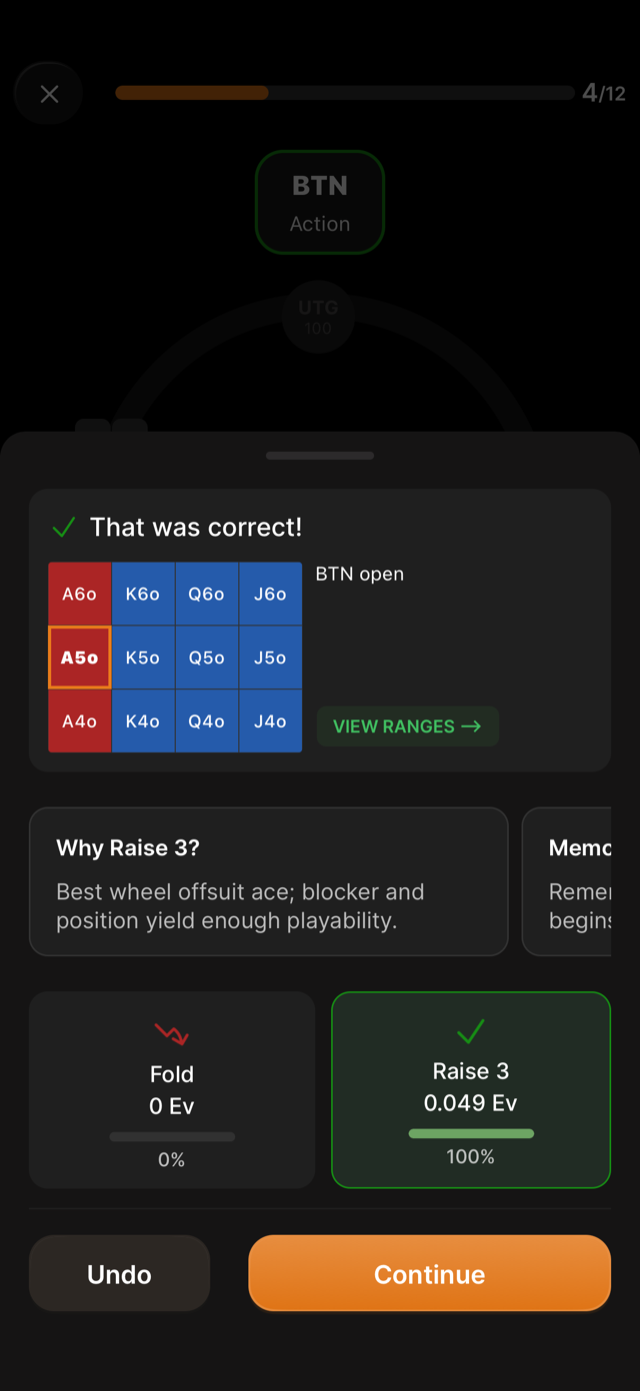
Every answer is scored immediately, on a panel that slides up over the table.
What the heading tells you
| Heading | What happened |
|---|---|
| That was correct! | Your answer matches the correct action |
| Almost there! followed by an EV figure | Wrong, and the figure is what the mistake cost |
| Sorry, the correct answer is a split | You picked one of several correct actions, but the spot needed all of them |
| Better luck next time! | Wrong, with no partial credit |
The EV figure is the difference between the best answer for this hand and the one you chose, shown to three decimals, for example “-0.245 EV.” It is the whole point of the exercise: not whether you were right, but how much the mistake costs.
Every action, with its EV
Below the result, each action available in the spot gets a card showing its expected value and how often it is the play: “Fold, 0 Ev, 0%” next to “Raise 3, 0.049 Ev, 100%”, with the correct one outlined in green and a red arrow on the one that loses value.
This is the part worth reading even when you were right. A spot where the two actions are 0.049 apart is close to a coin flip in EV terms; one where they are half a big blind apart is a real mistake, and the panel does not otherwise distinguish them.
Next to it sits a Why card with a one-line reason, for example “Best wheel offsuit ace; blocker and position yield enough playability.”
The streak bar
When you get a hand right that you have been reviewing, a bar appears reading “N correct in a row!” with up to seven segments filling in. That count is per hand, not per session, and it is what moves a hand from your study queue to your learned hands.
When you will see the hand again
Under the result, the app tells you the schedule it just set:
- “Next review in N days” when you answered correctly and the hand is on a streak.
- “We’ll check this again next session” when you got the hand wrong earlier in the same session and have now answered it correctly.
The buttons
- View Ranges opens the full range grid for this exact spot, so you can see where the hand sits in the range rather than only whether you were right.
- Memorize opens Memorization Tips for the hand.
- Continue moves to the next spot.
Undo sits next to Continue, for mis-taps. It asks “Are you sure you want to undo?” and tells you plainly: “Only use this option if you 100% knew the right answer but you mis-tapped.” Using it on a hand you genuinely got wrong keeps a real leak out of your stats, which is the one thing the app cannot detect and cannot correct for.
The difficulty will drift upwards
This is by design, and the app says so during your first session: “Questions will slowly get harder over time until the algorithm finds the edge of your current skill level. Keep going!” A run of misses usually means the difficulty found your edge, not that something is broken.