

The Ranges tab is a poker table rather than a menu of charts. You describe the spot by acting it out, and the chart follows. Every preflop chart in PlusEV’s Ranges tab is free forever, with or without a subscription.
Building the spot
The app’s own first-visit tip is the whole instruction:
Tap on a position, then choose their action. Repeat for other positions if there’s more than one player in the hand.
So a button-versus-cutoff spot is two taps and two actions: set what the cutoff did, then set the button. Any number of players can be given an action, which is how the multiway categories such as squeezes are reached.
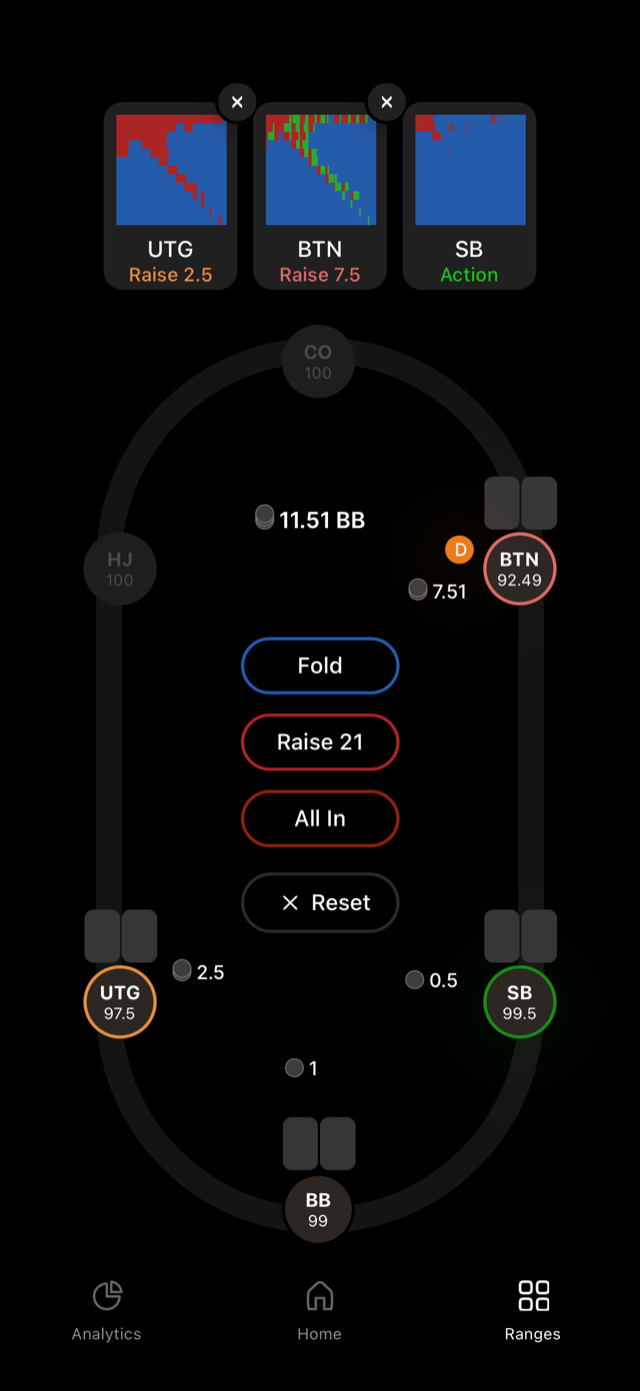
Each position you set turns into a card along the top, showing its action and a thumbnail of that position’s range: “UTG Raise 2.5”, “BTN Raise 7.5”, “SB Action”. The card marked Action is the one whose range the grid is currently showing. Remove a position with the x on its card, or clear the whole thing with Reset.
From a session
You do not have to come here to check a spot you just played. View Ranges on the feedback screen after any hand opens the same grid, already set to that spot, with your hand highlighted.
If a position looks wrong
Positions use the standard six-max names: UTG, HJ, CO, BTN, SB, BB. All six are defined in the app under Key Concepts if a label is unfamiliar.